Ranking · Home Office

Top 10 Monitors for Mac — Top 10

A Mac looks its best on a display macOS can scale cleanly: a 27-inch 5K panel at 218 ppi renders a pixel-doubled Retina workspace, while 27-inch 4K panels at 163 ppi still scale well for less money. Every pick here connects and charges over a single USB-C or Thunderbolt cable and covers the P3 wide color space Apple's own screens use.

10 products ranked · Selected from 14 products screened — · Scores from verified research — how the ARI Score works

Every product screened for this ranking

14 products were scored under the same ARI rubric. The Top 10 are ranked above; the rest are listed here with the ARI Score each one earned.

ProductCompanyPrice ARI Score
Apple Studio Display 27" 5K ★ #1Apple$1,59992
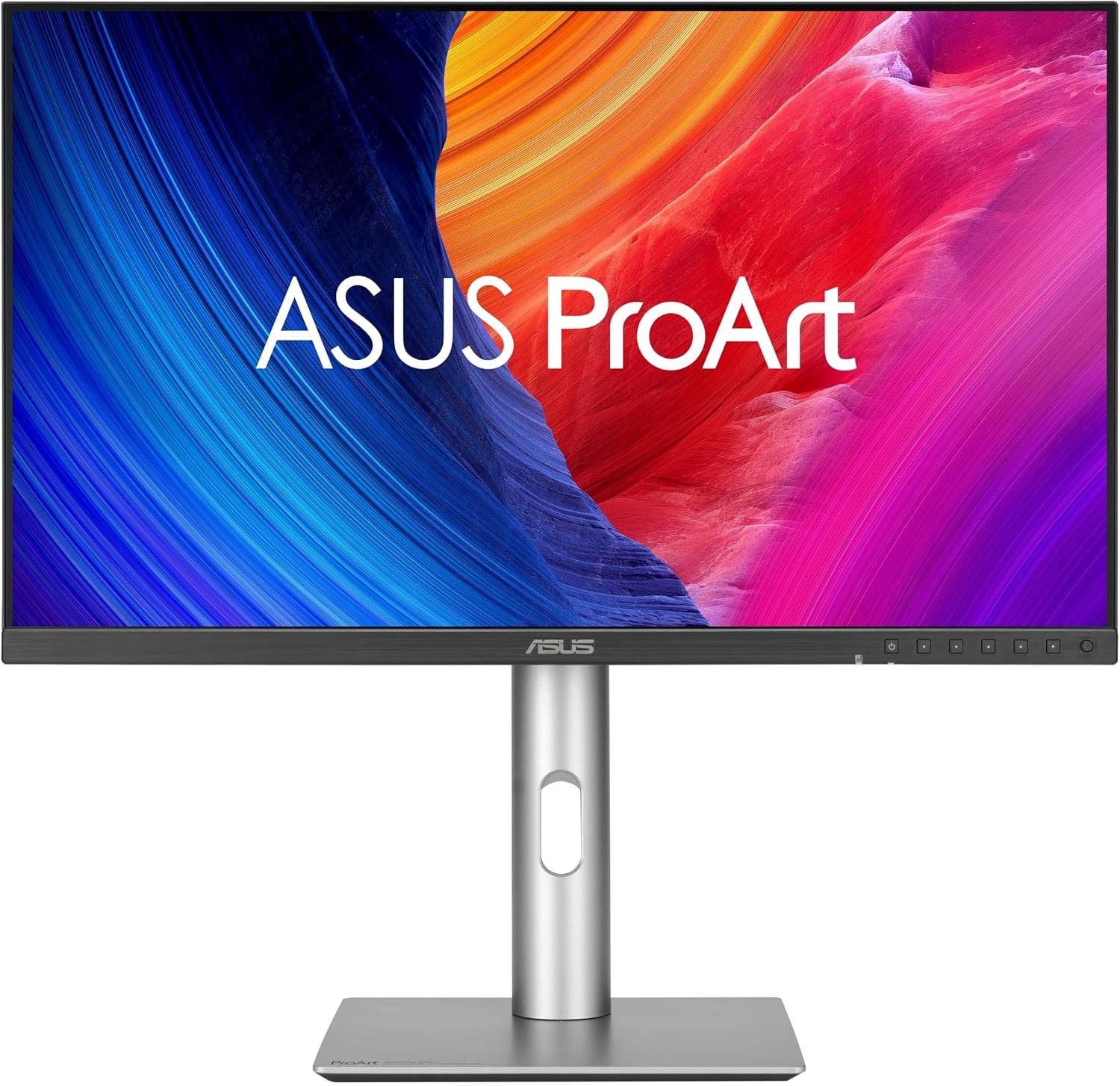
ASUS ProArt Display 5K PA27JCV 27" ★ #2ASUS$64990
Apple Studio Display XDR 27" 5K ★ #3Apple$3,29988
BenQ PD2730S 27" 5K ★ #4BenQ$1,10087
Dell UltraSharp 27 4K Thunderbolt Hub Monitor U2725QE ★ #5Dell$70086
Samsung ViewFinity S9 5K 27" ★ #6Samsung$1,60084
BenQ PD3225U 32" 4K ★ #7BenQ$85083
Alogic Clarity 5K 27" ★ #8Alogic$80779
LG UltraFine 27UP850N-W 27-inch 4K Monitor ★ #9LG$55076
MSI Modern MD271UL 27" 4K ★ #10MSI$30074
Dell U2724DE
QHD, not 4K — outside this category's scope
Dell$55087
LG UltraFine 5K 27MD5KL-B
Discontinued; only inflated third-party stock remains
LG—76
Alogic Clarity 5K Touch 27"
Touch model; US availability could not be verified
Alogic$1,60073
LG UltraFine 4K 24MD4KL-B
Discontinued; only refurbished US units found
LG—73

Pool prices are the prices recorded during research. Only the ranked products receive full verified reviews.

At a glance

#ProductRatingPrice Best for
1Apple Studio Display 27" 5K 92$1,599Mac users who want the reference Retina desktop display
2ASUS ProArt Display 5K PA27JCV 27" 90$649Retina 5K quality at half the Studio Display's price
3Apple Studio Display XDR 27" 5K 88$3,299HDR color grading and the most capable Mac desktop display
4BenQ PD2730S 27" 5K 87$1,100Designers who want 5K with Thunderbolt 4 daisy-chaining
5Dell UltraSharp 27 4K Thunderbolt Hub Monitor U2725QE 86$700A one-cable desk hub with Ethernet and 120Hz
6Samsung ViewFinity S9 5K 27" 84$1,600Studio Display features with a matte screen and smart-TV extras
7BenQ PD3225U 32" 4K 83$850A bigger 32-inch canvas for design work
8Alogic Clarity 5K 27" 79$8075K Retina density under $1,000 from a smaller brand
9LG UltraFine 27UP850N-W 27-inch 4K Monitor 76$550A name-brand 4K Mac monitor at a street price under $600
10MSI Modern MD271UL 27" 4K 74$300The cheapest 4K USB-C monitor worth putting on a Mac
Apple Studio Display 27
#1#1 in Category · 2026 \u2014 American Ranking Institute award badge

Apple Studio Display 27" 5K

ARI Score 92 $1,599

Best for: Mac users who want the reference Retina desktop display

27-inch 5K · 218 ppi600 nits · P3 wide colorThunderbolt 5 · 96W charging12MP Center Stage cameraSix-speaker Spatial Audio

Product review

The 2026 Studio Display keeps the 27-inch 5K panel that defines Retina scaling on a Mac — 5120×2880 at 218 ppi, so macOS renders a 2560×1440 workspace with every pixel doubled and text stays razor sharp. The refresh adds Thunderbolt 5 with 96W host charging, a second Thunderbolt 5 port for daisy-chaining, and an improved 12MP Center Stage camera with Desk View.

Color Options
Silver
Pros
  • True 218 ppi Retina scaling with no fractional-scaling softness
  • 600 nits and P3 color match Apple's own laptops
  • Camera, microphone array, and six speakers replace three desk accessories
  • Thunderbolt 5 daisy-chaining and 96W single-cable charging
Cons
  • Nano-texture glass adds $300; the height-adjustable stand is a higher-priced configuration
  • Still 60Hz with no local dimming
  • Only the tilt-adjustable stand is included at this price

The company

Apple is headquartered in Cupertino, California. The Studio Display carries a 1-year warranty with optional AppleCare+, and support runs through Apple Support and US Apple Stores.

ASUS ProArt Display 5K PA27JCV 27
#2ARI Top Pick \u2014 American Ranking Institute award badge

ASUS ProArt Display 5K PA27JCV 27"

ARI Score 90 $649

Best for: Retina 5K quality at half the Studio Display's price

27-inch 5K · 218 ppi99% DCI-P3 · ΔE < 2USB-C · 96W chargingDisplayHDR 500Full ergonomic stand

Product review

The ProArt PA27JCV matches the Studio Display's 218 ppi 5K resolution, so it scales identically in macOS — a pixel-doubled 2560×1440 workspace with no blur. It gives up Thunderbolt for a USB-C port with 96W charging, but adds a full ergonomic stand and an anti-glare LuxPixel coating at less than half Apple's price.

Color Options
Black
Pros
  • Same 218 ppi Retina scaling as Apple's own displays
  • 99% DCI-P3, factory calibrated to ΔE < 2
  • Height, swivel, pivot, and tilt adjustment all included
  • USB hub and Auto KVM built in
Cons
  • USB-C only — no Thunderbolt daisy-chaining
  • 400 nits typical brightness trails the Studio Display's 600
  • Basic 2W speakers and no webcam

The company

ASUS is a Taiwanese manufacturer with its US headquarters in Fremont, California. The PA27JCV carries a 3-year warranty, with US support by phone and online.

Apple Studio Display XDR 27
#3

Apple Studio Display XDR 27" 5K

ARI Score 88 $3,299

Best for: HDR color grading and the most capable Mac desktop display

27-inch 5K mini-LED · 218 ppi2,304 local dimming zones1,000 nits SDR · 2,000 peak120Hz Adaptive SyncThunderbolt 5 · 140W charging

Product review

The Studio Display XDR replaces the discontinued Pro Display XDR with a 27-inch 5K mini-LED panel: the same 218 ppi Retina scaling, plus 2,304 local dimming zones, 120Hz Adaptive Sync, and up to 2,000 nits of peak HDR brightness. It is the only display on this list that can serve as a true HDR reference monitor for a Mac.

Color Options
Silver
Pros
  • Mini-LED contrast of 1,000,000:1 that no other pick approaches
  • 120Hz at full 5K on supported Macs
  • Height-adjustable stand included, plus 140W charging
  • P3 and Adobe RGB modes for video and print work
Cons
  • $3,299 — more than double the standard Studio Display
  • Macs with M1–M3 chips are limited to 60Hz on it
  • Far more display than office or general creative work needs

The company

Apple is headquartered in Cupertino, California. The Studio Display XDR carries a 1-year warranty with optional AppleCare+, and support runs through Apple Support and US Apple Stores.

BenQ PD2730S 27
#4

BenQ PD2730S 27" 5K

ARI Score 87 $1,100

Best for: Designers who want 5K with Thunderbolt 4 daisy-chaining

27-inch 5K · 218 ppi98% P3 · ΔE ≤ 2Thunderbolt 4 · 90WThunderbolt out for daisy chainHotkey Puck G3 included

Product review

BenQ's PD2730S is a 5K, 218 ppi designer monitor that scales in macOS exactly like Apple's own Retina displays. Its Thunderbolt 4 input charges a MacBook at 90W, and a second Thunderbolt 4 port daisy-chains another display — a combination few 5K monitors offer at this price.

Color Options
White
Pros
  • 218 ppi Retina scaling with a glare-cutting Nano Matte panel
  • Thunderbolt 4 in and out for single-cable dual-display setups
  • 2000:1 native contrast doubles most IPS rivals
  • Wireless Hotkey Puck G3 and a built-in KVM switch
Cons
  • 400 nits is dimmer than the Studio Display and ViewFinity S9
  • Costs more than the ASUS 5K while matching its resolution
  • No webcam

The company

BenQ is a Taiwanese display maker with its Americas headquarters in Costa Mesa, California. The PD2730S carries a 3-year warranty, with US support by phone and online.

Dell UltraSharp 27 4K Thunderbolt Hub Monitor U2725QE product photo
#5

Dell UltraSharp 27 4K Thunderbolt Hub Monitor U2725QE

ARI Score 86 $700

Best for: A one-cable desk hub with Ethernet and 120Hz

27-inch 4K · 163 ppiIPS Black · 3000:1Thunderbolt 4 hub · 140W120Hz · DisplayHDR 6002.5GbE Ethernet built in

Product review

At 163 ppi, the U2725QE's 4K panel does not reach true Retina density, but macOS's scaled 2560×1440 mode stays clean, and its IPS Black panel doubles typical IPS contrast to 3000:1. The real draw is the hub: Thunderbolt 4 with 140W charging, a downstream Thunderbolt port, pop-out USB ports, and 2.5GbE Ethernet behind a single cable.

Color Options
Platinum Silver
Pros
  • 140W Thunderbolt 4 charging — enough to fast-charge a 16-inch MacBook Pro
  • 120Hz makes scrolling visibly smoother than the 60Hz rivals
  • Built-in Ethernet and the deepest USB hub on this list
  • 3-year warranty with Advanced Exchange and Premium Panel Exchange
Cons
  • 163 ppi is a step below the 218 ppi 5K models for text sharpness
  • No built-in speakers or webcam
  • Business styling with a pop-out front hub

The company

Dell is headquartered in Round Rock, Texas. UltraSharp monitors carry a 3-year warranty with Advanced Exchange and Premium Panel Exchange, and US support is handled through Dell's support site and service-tag system.

Samsung ViewFinity S9 5K 27
#6

Samsung ViewFinity S9 5K 27"

ARI Score 84 $1,600

Best for: Studio Display features with a matte screen and smart-TV extras

27-inch 5K · 218 ppi600 nits · 99% DCI-P3Thunderbolt 4 · 90WDetachable 4K webcamMatte finish · Smart TV apps

Product review

Samsung's ViewFinity S9 matches the Studio Display's 5K resolution and 218 ppi, so macOS scaling is identically sharp, and it includes the matte finish and height-adjustable stand Apple charges extra for. A detachable 4K camera, built-in speakers, and Tizen smart-TV apps make it the most entertainment-ready 5K monitor here.

Color Options
Silver
Pros
  • 218 ppi Retina scaling with a reflection-cutting matte panel
  • Height, tilt, and pivot stand included in the price
  • 4K SlimFit camera and phone-based Smart Calibration
  • Works as a standalone smart TV with AirPlay
Cons
  • List price matches the Studio Display, though Samsung discounts it often
  • 1000:1 contrast is ordinary next to IPS Black and mini-LED rivals
  • Smart-TV software adds menus some users will never open

The company

Samsung Electronics is headquartered in South Korea, with its US arm based in Ridgefield Park, New Jersey. The ViewFinity S9 carries a 3-year warranty, with US support by phone and online.

View on AmazonNo Official Site
BenQ PD3225U 32
#7

BenQ PD3225U 32" 4K

ARI Score 83 $850

Best for: A bigger 32-inch canvas for design work

32-inch 4K · 140 ppiIPS Black · 2000:198% P3 · ΔE ≤ 2Thunderbolt 3 · 85WM-Book Mac color mode

Product review

The PD3225U trades pixel density for size: its 32-inch 4K panel works out to about 140 ppi, so text is less crisp than on the 27-inch 5K models, but the larger canvas suits layout work and video timelines. Thunderbolt 3 with 85W charging, a daisy-chain port, and BenQ's M-Book Mac color mode keep it firmly Mac-oriented.

Color Options
Black
Pros
  • 32-inch screen gives timelines and palettes more room
  • IPS Black panel doubles standard IPS contrast
  • Thunderbolt daisy-chaining and a built-in KVM switch
  • Full ergonomic stand, speakers, and Hotkey Puck G2 included
Cons
  • 140 ppi is visibly softer than 218 ppi 5K for text
  • Thunderbolt 3 and 85W charging trail the newer rivals
  • BenQ's US price has moved between $849.99 and $1,099.99

The company

BenQ is a Taiwanese display maker with its Americas headquarters in Costa Mesa, California. The PD3225U carries a 3-year warranty, with US support by phone and online.

Alogic Clarity 5K 27
#8

Alogic Clarity 5K 27"

ARI Score 79 $807

Best for: 5K Retina density under $1,000 from a smaller brand

27-inch 5K · 218 ppi65W USB-C chargingBuilt-in USB-C hubFull ergonomic standFactory calibrated

Product review

Alogic's Clarity 5K brings the key Mac spec — a 5120×2880 panel at 218 ppi, so macOS scales it exactly like a Retina display — down to $807.49 direct from Alogic's own US store. It skips Thunderbolt for a plain USB-C connection with 65W charging and a small built-in hub for two accessories and audio.

Color Options
Silver
Pros
  • True 218 ppi Retina scaling for well under $1,000
  • Factory-calibrated wide-gamut panel
  • Height, tilt, swivel, and pivot stand included
  • USB-C hub covers two accessories and audio over one cable
Cons
  • 65W charging is light for a 16-inch MacBook Pro under heavy load
  • No Thunderbolt, daisy-chaining, or webcam
  • Smaller brand with a thinner US support footprint than Apple, Dell, or BenQ

The company

Alogic is an Australian accessories and display maker that sells direct in the US through its own online store. Clarity monitors carry a 2-year warranty, with support handled online.

LG UltraFine 27UP850N-W 27-inch 4K Monitor product photo
#9

LG UltraFine 27UP850N-W 27-inch 4K Monitor

ARI Score 76 $550

Best for: A name-brand 4K Mac monitor at a street price under $600

27-inch 4K · 163 ppi95% DCI-P3 · HDR 400USB-C · 90W chargingHeight and pivot stand2× 5W speakers

Product review

LG's 27UP850N-W is a 27-inch 4K panel at 163 ppi — macOS runs it at a scaled 2560×1440 workspace that looks good, if not quite Retina-crisp. Its USB-C port charges at 90W and it includes speakers and a height-adjustable stand, but LG has discontinued the model on its own US site, so it is now a retail-channel buy while stock lasts.

Color Options
White
Pros
  • 90W USB-C charging covers any current MacBook
  • 95% DCI-P3 color with hardware-calibration support
  • Speakers and a height/pivot stand included
  • US street prices have run well under the $549.99 list price
Cons
  • Discontinued on LG's US site; availability varies by retailer
  • Only a 1-year US warranty
  • No Thunderbolt or daisy-chaining

The company

LG Electronics is headquartered in Seoul, South Korea, with its US headquarters in Englewood Cliffs, New Jersey. This model carries a 1-year US parts-and-labor warranty, with support by phone and online.

MSI Modern MD271UL 27
#10The Buck Blazer \u2014 lowest price in this category, American Ranking Institute award badge

MSI Modern MD271UL 27" 4K

ARI Score 74 $300

Best for: The cheapest 4K USB-C monitor worth putting on a Mac

27-inch 4K · 163 ppi99% DCI-P3USB-C · 65W charging300 nits · IPSRed Dot Award 2023 design

Product review

The Modern MD271UL is the budget route to a sharper Mac desktop: 4K at 163 ppi, which macOS scales cleanly, plus 99% DCI-P3 color coverage that most sub-$300 monitors skip. Its USB-C port charges at 65W, but the tilt-only stand, 300-nit panel, and the lack of speakers and a VESA mount show where the money was saved. The slim design won a Red Dot Award in 2023.

Color Options
Iron Gray
Pros
  • 4K resolution and 99% DCI-P3 color for $299.99
  • 65W USB-C single-cable connection
  • Slim, award-winning design with an aluminium-alloy stand
Cons
  • Tilt-only stand and no VESA mount
  • 300 nits is the dimmest panel on this list, and there are no speakers
  • US stock has been intermittent — check availability before counting on it

The company

MSI is a Taiwanese manufacturer whose US arm, MSI Computer Corp., is based in City of Industry, California. The MD271UL carries a 3-year warranty, and MSI publishes a dedicated US monitor support line.

View on AmazonNo Official Site

The verdict

For most Mac users the ASUS ProArt PA27JCV is the value story of this list — true 218 ppi 5K for $649 — but Apple's Studio Display remains the benchmark for brightness, camera, speakers, and one-cable integration. The Studio Display XDR stands alone for HDR reference work, the Dell U2725QE is the hub to beat, and the MSI Modern MD271UL proves a color-accurate 4K Mac setup no longer has to cost more than $300.

Questions, answered

Why does 5K matter for a Mac?

macOS is designed around pixel doubling. A 27-inch 5K display (5120×2880, 218 ppi) shows a 2560×1440 workspace with every logical pixel drawn by four physical pixels, so text and interface elements stay perfectly sharp. A 27-inch 4K display (163 ppi) usually runs a scaled 2560×1440 mode that looks good but renders slightly off-native, or a native 1920×1080 workspace that wastes much of the panel.

Is 4K sharp enough, or should I pay for 5K?

For text-heavy work at a normal desk distance, 5K at 218 ppi is visibly crisper and matches the density of Apple's built-in Retina displays. 4K at 163 ppi is a reasonable compromise — especially in the Dell and BenQ hub monitors — and costs hundreds of dollars less.

What happened to the Apple Pro Display XDR?

Apple discontinued the Pro Display XDR in March 2026 and replaced it with the 27-inch Studio Display XDR, which keeps the 5K resolution but moves to a mini-LED panel with 120Hz refresh, 2,304 local dimming zones, and Thunderbolt 5. Any Pro Display XDR still listed for sale is old stock; the Studio Display XDR is the current model ranked here.

How much charging wattage does my MacBook need from a monitor?

Every monitor here charges over the same cable that carries video. The 65W models (Alogic, MSI) handle a MacBook Air or a 14-inch MacBook Pro in normal use; 90–96W models cover a 16-inch MacBook Pro's standard charging; and the Dell U2725QE and Studio Display XDR deliver 140W, enough to fast-charge a 16-inch model.

Can I connect two of these monitors to one Mac?

Models with a Thunderbolt output port — the BenQ PD2730S and PD3225U, the Dell U2725QE, and both Apple displays — can daisy-chain a second display, subject to your Mac's external-display limit, which varies by chip. The USB-C-only models (ASUS, Alogic, MSI, LG) need a separate port or a dock for each screen.

Prices shown are for a single monitor in the size and resolution named in each product's title, with its standard stand and finish. Prices are typical US street prices observed during research and change often — check the retailer for the current price. ARI may earn a commission from links on this page; commissions never change a score. See the affiliate disclosure and methodology.