Ranking · Home Office

Top 10 Office Mice — Top 10

An office mouse is the tool your hand touches all day, so fit, scrolling and battery life matter more than headline sensor numbers. We ranked the ten best mice for desk work sold in the US today — full-size productivity models, a compact travel pick, two vertical ergonomic mice and a thumb trackball — on performance, company accountability, owner satisfaction and value. Prices are US list prices for a single mouse in its standard configuration.

10 products ranked · Selected from 17 products screened — · Scores from verified research — how the ARI Score works

Every product screened for this ranking

17 products were scored under the same ARI rubric. The Top 10 are ranked above; the rest are listed here with the ARI Score each one earned.

ProductCompanyPrice ARI Score
Logitech MX Master 4 ★ #1Logitech$12093
Logitech MX Anywhere 3S ★ #2Logitech$9090
Logitech Lift Vertical ★ #3Logitech$8088
Logitech MX Ergo S ★ #4Logitech$12086
Dell Premier Rechargeable Mouse MS900 ★ #5Dell$10085
Razer Pro Click V2 ★ #6Razer$10084
Keychron M6 ★ #7Keychron$5083
Apple Magic Mouse ★ #8Apple$7979
Logitech Signature M650 L ★ #9Logitech$4077
Kensington Pro Fit Ergo Vertical ★ #10Kensington$3575
Logitech MX Master 3S
Superseded by the newer MX Master 4
Logitech$10092
Logitech MX Vertical
Third vertical passed; slate already carries two
Logitech$12085
Razer Pro Click Mini
Effectively discontinued; replaced by the Pro Click V2
Razer—78
Incase "Designed by Microsoft" Bluetooth Ergonomic Mouse
Successor mouse not buyable; no live US link
Incase$6075
Kensington Orbit Fusion
Spotty US stock; 2.4 GHz receiver only
Kensington—75
Logitech M720 Triathlon
Aging design with a basic 1,000 DPI sensor
Logitech—74
Keychron M3
Gaming-leaning; no multi-device switching for office use
Keychron$5074

Pool prices are the prices recorded during research. Only the ranked products receive full verified reviews.

At a glance

#ProductRatingPrice Best for
1Logitech MX Master 4 93$120The best all-round desk mouse, now with haptics and an on-screen Actions Ring
2Logitech MX Anywhere 3S 90$90Flagship features in a travel-size mouse
3Logitech Lift Vertical 88$80Wrist relief for small-to-medium hands
4Logitech MX Ergo S 86$120Trackball control with zero arm movement
5Dell Premier Rechargeable Mouse MS900 85$100Business laptops, with the strongest warranty here
6Razer Pro Click V2 84$100Gaming-grade hardware for heavy spreadsheet and creative work
7Keychron M6 83$50MX Master-style features at half the price
8Apple Magic Mouse 79$79Mac users who navigate by gesture
9Logitech Signature M650 L 77$40Large hands and quiet clicks under $40
10Kensington Pro Fit Ergo Vertical 75$35The cheapest credible vertical mouse
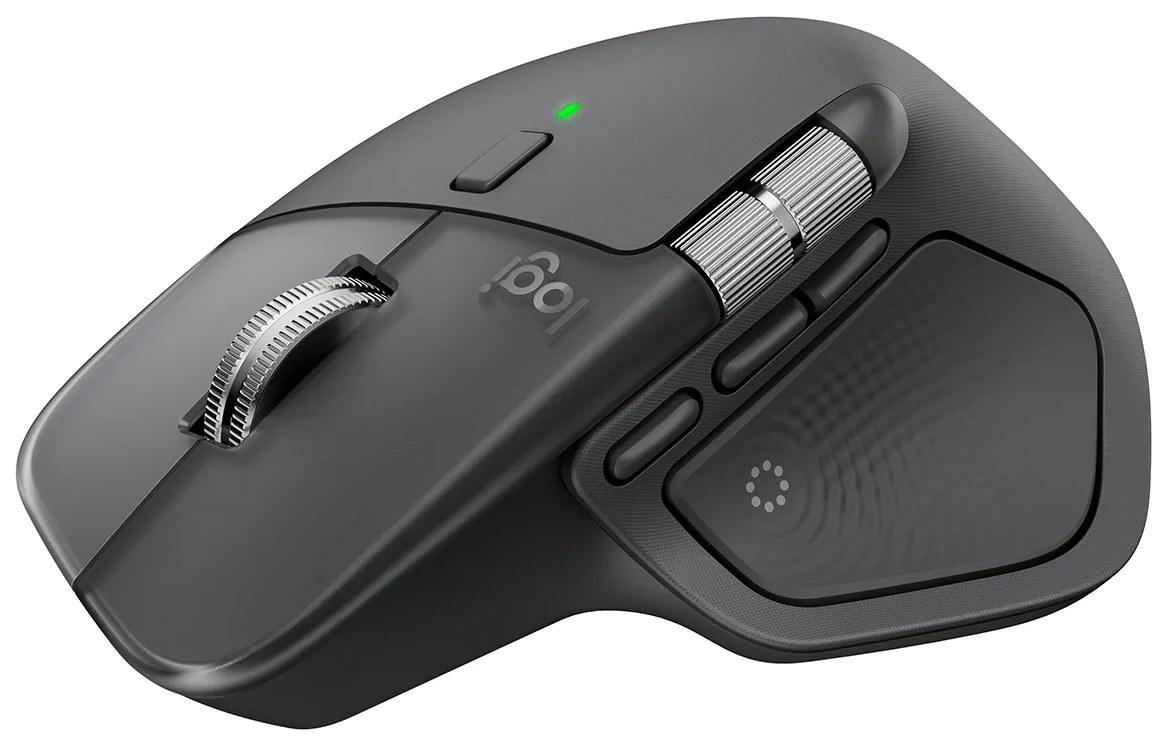
Logitech MX Master 4 product photo
#1#1 in Category · 2026 \u2014 American Ranking Institute award badge

Logitech MX Master 4

ARI Score 93 $120

Best for: The best all-round desk mouse, now with haptics and an on-screen Actions Ring

8,000 DPI Darkfield — tracks on glassHaptic Sense Panel + Actions RingMagSpeed + thumb scroll wheelsUp to 70 days per charge3 devices · Bluetooth + USB-C Logi Bolt

Product review

Logitech's fourth-generation flagship keeps the MX Master 3S formula — an 8,000 DPI Darkfield sensor that tracks on glass, MagSpeed and thumb scroll wheels, quiet clicks and a 70-day battery — and adds a haptic panel in the thumb rest that buzzes for scrolling, gestures and app shortcuts, plus an Actions Ring button that opens an on-screen shortcut overlay at the cursor in Logi Options+. The shell grows slightly to 150 g and swaps the 3S's rubberized coating for a smoother, stain-resistant finish, and the included Logi Bolt receiver is now USB-C.

Color Options
GraphiteBlackPale Gray
Pros
  • Haptic feedback and the Actions Ring genuinely speed up repetitive app work
  • Same class-leading MagSpeed scrolling and glass tracking as the 3S
  • Stronger wireless connection, and the Bolt receiver in the box is now USB-C
  • Stain-resistant finish replaces the 3S coating that wore sticky and shiny over time
Cons
  • $119.99 — $20 more than the 3S, for the same sensor and battery rating
  • 150 g and right-handed only, and the rearranged thumb buttons take relearning
  • Haptics and the Actions Ring need Logi Options+ and supported apps to earn their keep

The company

Logitech is headquartered in Lausanne, Switzerland, with its Americas office in San Jose, California. The MX Master 4 carries a 1-year limited hardware warranty, and US support runs through Logitech's online support portal.

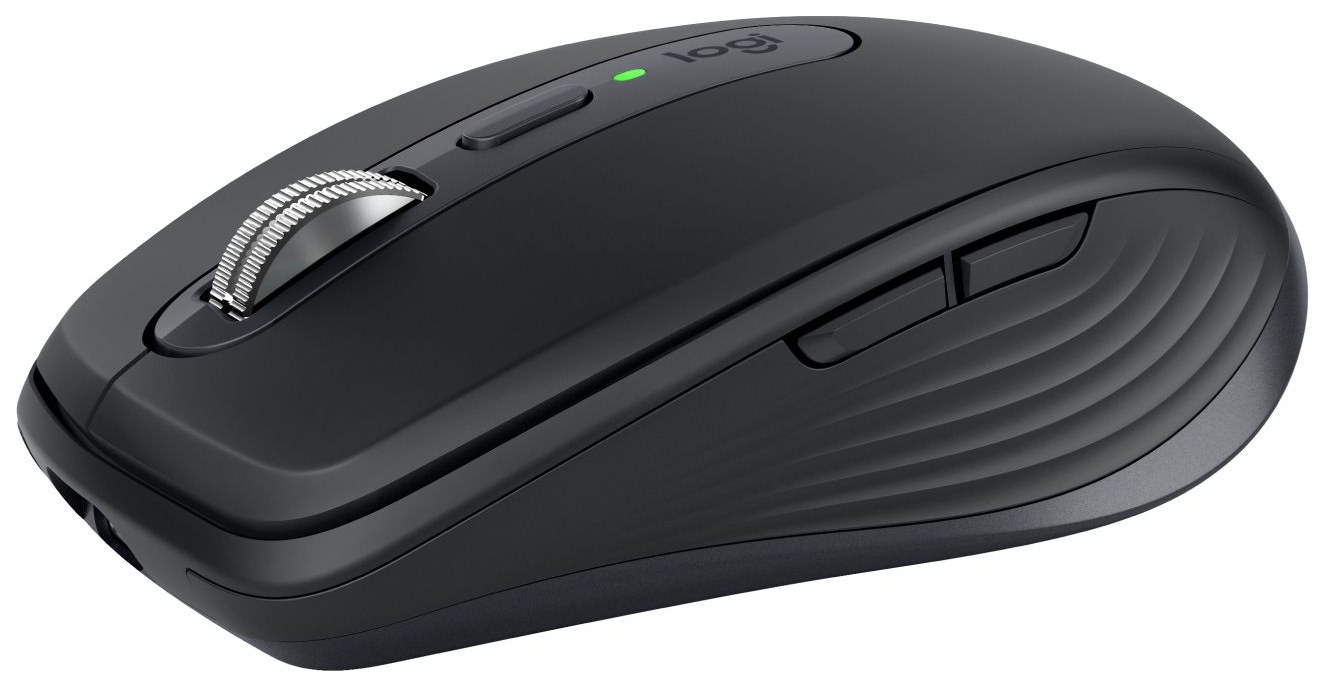
Logitech MX Anywhere 3S product photo
#2ARI Top Pick \u2014 American Ranking Institute award badge

Logitech MX Anywhere 3S

ARI Score 90 $90

Best for: Flagship features in a travel-size mouse

8,000 DPI Darkfield — tracks on glassMagSpeed auto-shift wheel99 g compact shellUp to 70 days per chargeQuiet Clicks

Product review

The Anywhere 3S shrinks the MX Master formula into a 99 g travel mouse: the same 8,000 DPI Darkfield sensor and auto-shifting MagSpeed wheel, the same Quiet Clicks, and the same 70-day battery. It pairs with three devices over Bluetooth and works with a Logi Bolt receiver — though the receiver is not in the box.

Color Options
GraphiteBlackPale GrayRose
Pros
  • Nearly all of the MX Master 3S's hardware at 99 g
  • Tracks on glass, so no mouse pad is needed on the road
  • USB-C fast charge: 1 minute adds about 3 hours
Cons
  • No Logi Bolt receiver included
  • Compact shell can cramp large hands
  • No dedicated thumb wheel — horizontal scroll uses a side-button shortcut

The company

Logitech is headquartered in Lausanne, Switzerland, with its Americas office in San Jose, California. The MX Anywhere 3S carries a 1-year limited hardware warranty, and US support runs through Logitech's online support portal.

Logitech Lift Vertical product photo
#3

Logitech Lift Vertical

ARI Score 88 $80

Best for: Wrist relief for small-to-medium hands

57° vertical handshake gripSmall-to-medium hands; left version sold1× AA — up to 24 months4,000 DPIQuiet clicks

Product review

The Lift holds your hand at a 57-degree handshake angle to take the twist out of your forearm, in a shell sized for small-to-medium hands — including a dedicated left-handed version. A single AA battery runs it for up to 24 months, and it switches between three devices over Bluetooth or the included Logi Bolt receiver.

Color Options
GraphiteOff-whiteRose
Pros
  • 57° angle eases forearm pronation through long days
  • Left-handed version available — rare among vertical mice
  • Two years of battery from one AA cell
  • Quiet clicks and a soft-touch thumb rest
Cons
  • AA-powered, not rechargeable
  • Too small for large hands
  • No horizontal scroll wheel

The company

Logitech is headquartered in Lausanne, Switzerland, with its Americas office in San Jose, California. The Lift carries a 1-year limited hardware warranty, and US support runs through Logitech's online support portal.

Logitech MX Ergo S product photo
#4

Logitech MX Ergo S

ARI Score 86 $120

Best for: Trackball control with zero arm movement

Thumb trackball · 512–2,048 DPI20° adjustable tiltUp to 120 days per chargeQuiet clicks2 devices · Bluetooth + Logi Bolt

Product review

Logitech's premium trackball keeps your arm still: your thumb rolls the ball while the shell sits on a hinge that tilts to 20 degrees, a design Logitech says reduces forearm muscle strain. The S update adds Quiet Clicks and USB-C charging — up to 120 days per charge — and it pairs with two devices over Bluetooth or the included Logi Bolt receiver.

Color Options
Graphite
Pros
  • Cursor control without moving your arm — good for tight desks
  • Tilt hinge adjusts from flat to 20°
  • Four months between charges
  • Precision-mode button for fine, slow work
Cons
  • USB-C charging cable not included
  • Heavy at 259 g with the tilt plate fitted
  • Thumb-ball control takes practice, and the ball needs periodic cleaning

The company

Logitech is headquartered in Lausanne, Switzerland, with its Americas office in San Jose, California. The MX Ergo S carries a 1-year limited hardware warranty, and US support runs through Logitech's online support portal.

Dell Premier Rechargeable Mouse MS900 product photo
#5

Dell Premier Rechargeable Mouse MS900

ARI Score 85 $100

Best for: Business laptops, with the strongest warranty here

8,000 DPI — tracks on glassDual scroll wheels3 devices · Bluetooth 5.1 + Secure LinkUp to 3 months per charge128.4 g sculpted shell

Product review

Dell's flagship office mouse is the business answer to the MX Master: an 8,000 DPI sensor that tracks on glass, a fast vertical wheel plus a thumb wheel for horizontal scrolling, and pairing for three devices — two over Bluetooth 5.1 and one over the encrypted Dell Secure Link receiver. A full charge lasts up to three months, and two minutes on USB-C buys a full day of use.

Color Options
Graphite
Pros
  • 3-year warranty with Advanced Exchange Service — the best in this ranking
  • Encrypted Secure Link receiver suits locked-down offices
  • Dual wheels handle wide spreadsheets well
  • Two-minute charge returns a full day of use
Cons
  • Dell Peripheral Manager customization is Windows-only
  • Clicks are not silent-rated
  • Right-handed only

The company

Dell Technologies is headquartered in Round Rock, Texas. The MS900 carries a 3-year limited hardware warranty with Advanced Exchange Service, and US support runs through Dell's support site and nationwide service network.

Razer Pro Click V2 product photo
#6

Razer Pro Click V2

ARI Score 84 $100

Best for: Gaming-grade hardware for heavy spreadsheet and creative work

Focus Pro 30K · 30,000 DPIHyperScroll tilt wheel9 programmable buttonsUp to 3.5 months per charge~110 g

Product review

Razer's productivity flagship borrows its gaming hardware: a Focus Pro 30K optical sensor that tracks on glass, a HyperScroll tilt wheel with free-spin and notched modes, and nine programmable buttons. It connects to three devices over Bluetooth plus a HyperSpeed dongle, and runs up to 3.5 months per USB-C charge — but its mechanical switches click audibly, unlike the quiet Logitech flagships.

Color Options
Black
Pros
  • Sensor tracks on glass and is far more precise than office work demands
  • Free-spin and tactile scroll modes, plus tilt scrolling
  • 2-year warranty — double Logitech's
  • Five-minute charge returns 2–3 working days
Cons
  • Mechanical clicks are audible — not a silent mouse
  • Sold only through Razer.com and RazerStores; its Amazon listing had no featured offer at check time
  • Large shell suits medium-to-large hands only

The company

Razer is dual-headquartered in Irvine, California and Singapore. The Pro Click V2 carries a 2-year warranty, and US support runs through Razer's online support portal.

Keychron M6 product photo
#7The Buck4Buck — best value in this category, American Ranking Institute award badge

Keychron M6

ARI Score 83 $50

Best for: MX Master-style features at half the price

PixArt 3395 · 26,000 DPIDual scroll wheels, incl. free-spin78 gTri-mode · 3-device Bluetooth800 mAh rechargeable

Product review

The M6 copies the MX Master playbook at half the price: an ergonomic shell with a dual-mode main wheel — notched or infinite free-spin — plus a thumb wheel, a 26,000 DPI PixArt 3395 sensor, and tri-mode connection over 2.4 GHz, Bluetooth (three devices) or USB-C. It weighs just 78 g; the trade-off is battery life measured in days to weeks, not months. Ranked here in its standard 3395 configuration at $49.99.

Color Options
BlackWhite
Pros
  • Dual scroll wheels and an MX Master-style shape for $49.99
  • Only 78 g — the lightest full-size mouse here
  • Silent-switch configuration sold at the same base price
  • Wired USB-C mode works while charging
Cons
  • Rechargeable battery needs topping up every week or two of heavy use
  • Support is email-only and the warranty is 1 year
  • Four sensor and wheel variants make the listing easy to misread — check the configuration before buying

The company

Keychron is based in Shenzhen, China, with a US entity (Keychron, Inc.) and US-warehouse shipping on its own store. The M6 carries a 1-year warranty, and support is by email.

Apple Magic Mouse product photo
#8

Apple Magic Mouse

ARI Score 79 $79

Best for: Mac users who navigate by gesture

Multi-Touch gesture surfaceBluetooth onlyAbout 1 month per charge99 g low-profile shellUSB-C charging

Product review

Apple's mouse is a Multi-Touch surface first and a mouse second: swipes scroll, turn pages and switch apps in macOS, with no wheel or side buttons at all. It is slim, ambidextrous and pairs instantly with a Mac, and a charge lasts about a month — but the USB-C charging port sits on the underside, so it cannot be used while it charges.

Color Options
WhiteBlack
Pros
  • Gesture surface handles scrolling and macOS navigation without a wheel
  • Pairs automatically with a Mac and needs no receiver
  • Slim profile slips into a laptop sleeve
Cons
  • Charging port is on the underside — the mouse is unusable while charging
  • No side buttons and no wheel, and a low flat shape many hands find uncomfortable
  • Effectively Mac-first; Windows use is basic

The company

Apple is headquartered in Cupertino, California. The Magic Mouse carries a 1-year Apple Limited Warranty, with US support by phone, online and at Apple Store Genius Bars.

Logitech Signature M650 L product photo
#9

Logitech Signature M650 L

ARI Score 77 $40

Best for: Large hands and quiet clicks under $40

Full-size shell for large handsSilentTouch quiet clicksSmartWheel scrolling1× AA — up to 24 monthsBluetooth + Logi Bolt

Product review

The Signature M650 L is Logitech's sized-up budget mouse: a full-size shell for large hands — a left-handed version is sold too — with SilentTouch clicks and a SmartWheel that switches between line-by-line and free-spin scrolling. One AA battery lasts up to 24 months over the included Logi Bolt receiver, but it connects to one device at a time, with no Easy-Switch button.

Color Options
GraphiteBlackOff-whiteClassic RedClassic Blue
Pros
  • Proper fit for large hands, with a left-handed version
  • Silent clicks and a two-year battery
  • Costs less than half the MX line
Cons
  • One device at a time — no multi-device switching
  • AA battery instead of USB-C rechargeable
  • 400–4,000 DPI sensor is a step down from the MX line

The company

Logitech is headquartered in Lausanne, Switzerland, with its Americas office in San Jose, California. The Signature M650 L carries a 1-year limited hardware warranty, and US support runs through Logitech's online support portal.

Kensington Pro Fit Ergo Vertical product photo
#10The Buck Blazer \u2014 lowest price in this category, American Ranking Institute award badge

Kensington Pro Fit Ergo Vertical

ARI Score 75 $35

Best for: The cheapest credible vertical mouse

46.7° handshake slope800–1,600 DPI switch6 buttons1× AA — up to 1 year2.4 GHz nano receiver

Product review

Kensington's vertical mouse is the low-cost way to test a handshake grip: a 46.7-degree slope, an extended lip that supports the little finger, and six buttons including a DPI switch (800–1,600). It connects by a plug-and-play 2.4 GHz nano receiver only — no Bluetooth — and runs up to a year on one AA battery.

Color Options
BlackGray
Pros
  • 3-year warranty at the lowest price in this ranking
  • Little-finger lip supports the whole hand, not just the palm
  • Plug-and-play — no software or pairing needed
Cons
  • Receiver only: no Bluetooth, and one device at a time
  • 1,600 DPI ceiling is the lowest here
  • Clicks are not silent-rated

The company

Kensington, a division of ACCO Brands, is headquartered in San Mateo, California. The Pro Fit Ergo Vertical carries a 3-year limited warranty, with US technical support by phone.

The verdict

Start with the MX Master 4: nothing else here matches its combination of glass tracking, MagSpeed scrolling, quiet clicks and the new haptic thumb panel with its on-screen Actions Ring, and the MX Anywhere 3S packs the same kit into a travel-size shell. If your wrist is the problem, the Lift's 57-degree grip is the gentlest fix, and the MX Ergo S removes arm movement altogether. On a budget, the Signature M650 L fits large hands for $39.99, and the Kensington Pro Fit Ergo Vertical — $34.99 with a 3-year warranty — is the cheapest mouse in this ranking and the cheapest one worth recommending.

Questions, answered

Which mouse is best for a full day of desk work?

The Logitech MX Master 4. Its sculpted shell, MagSpeed scroll wheel, thumb wheel and 8,000 DPI sensor that tracks on glass cover long documents, wide spreadsheets and multi-monitor setups without a mouse pad, and it switches between three computers. If you work away from a desk often, the MX Anywhere 3S offers nearly the same hardware at 99 g.

Are vertical mice really easier on the wrist?

A vertical mouse holds your hand in a handshake position, which reduces the forearm twist (pronation) of a flat mouse. The Logitech Lift tilts to 57 degrees and the Kensington Pro Fit Ergo Vertical to 46.7 degrees. Expect an adjustment period of a few days, and note the sizing: the Lift is built for small-to-medium hands, the Kensington for medium-to-large.

Should I choose Bluetooth or a USB receiver?

Bluetooth pairs directly with a laptop and saves a port; receivers (Logi Bolt, Dell Secure Link) are pre-paired, tend to be more reliable in dense offices, and work before the operating system loads. Most mice here offer both. The exceptions are the Apple Magic Mouse (Bluetooth only) and the Kensington Pro Fit Ergo Vertical (receiver only).

Rechargeable or AA battery — which is better in an office mouse?

Rechargeable models here run from about 70 days (MX Master 4) to 3.5 months (Razer Pro Click V2) per USB-C charge. AA-powered models run far longer per cell — up to 24 months for the Logitech Lift and Signature M650 L, up to a year for the Kensington — and swap in seconds, but the battery is a recurring consumable. The Keychron M6 is the outlier: its rechargeable battery is rated in hours (up to 180 on Bluetooth), so expect to charge it every week or two of heavy use.

Is a trackball worth trying for office work?

If desk space is tight or arm movement aggravates your shoulder, yes. The Logitech MX Ergo S moves the cursor with your thumb while your arm stays still, and its base tilts to 20 degrees. Budget about a week to get precise, and clean the ball regularly — dust under the ball is the main cause of scratchy tracking.

Prices shown are for a single mouse in its standard configuration. Prices are typical US street prices observed during research and change often — check the retailer for the current price. ARI may earn a commission from links on this page; commissions never change a score. See the affiliate disclosure and methodology.